AGRO ABC
Here you can find information about the Department of Agroecology from A-Z as well as links for important websites at Aarhus University.
AGRO - Structure, organisation, and departments
AGRO - Structure, organisation, and departments
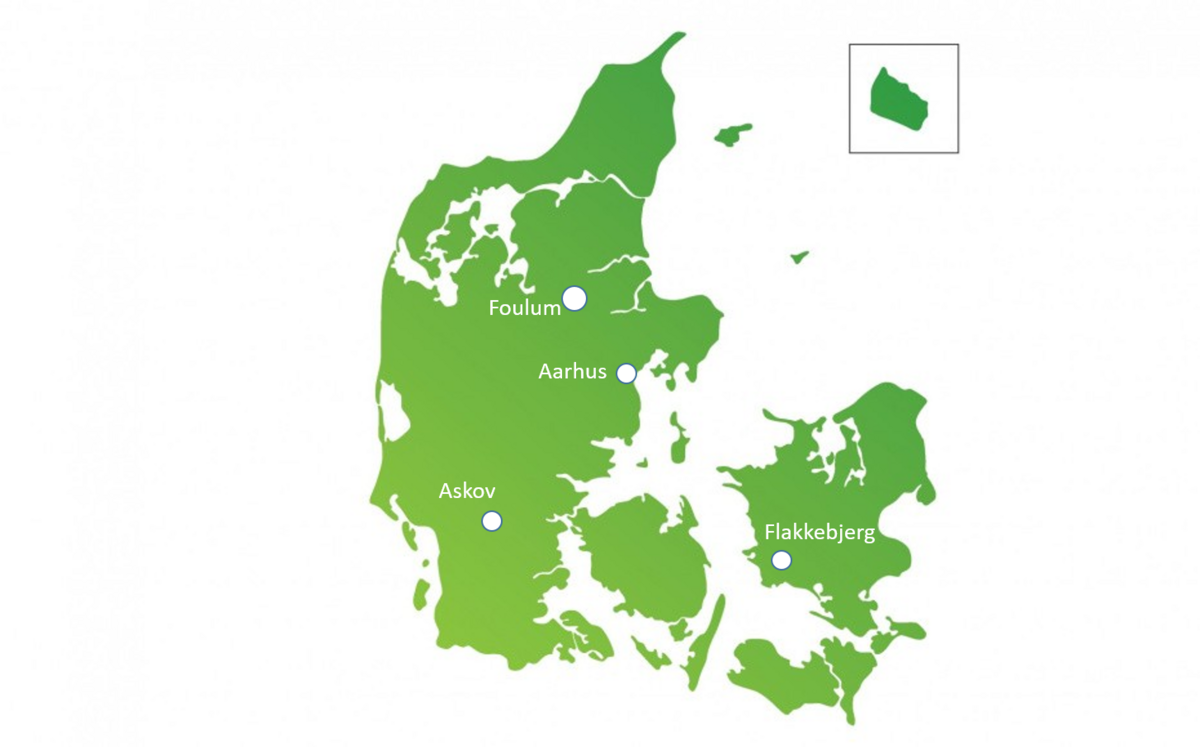
The Department of Agroecology is a department under Technical Sciences at Aarhus University with the majority of its employees physically located in Foulum or at Flakkebjerg. Furthermore, we have employees working in Aarhus as well as at the experimental station in Askov, which is also responsible for the experiments conducted at Jyndevad.
Agroecology is organised with a head of department, a vice head of department, one head of secretariat, eight research sections, and three operational stations. The research sections consist of one section manager, one research group coordinator, plus a number of VIPs (academic staff) and a number of TAPs (technical- and administrative staff). The operational stations are located at Foulumgård, Flakkebjerg, and in Askov – and they are responsible for the day-to-day operation of the majority of the department’s experiments.
Working safely in laboratories, fields and greenhouses
Working safely in laboratories, fields and greenhouses
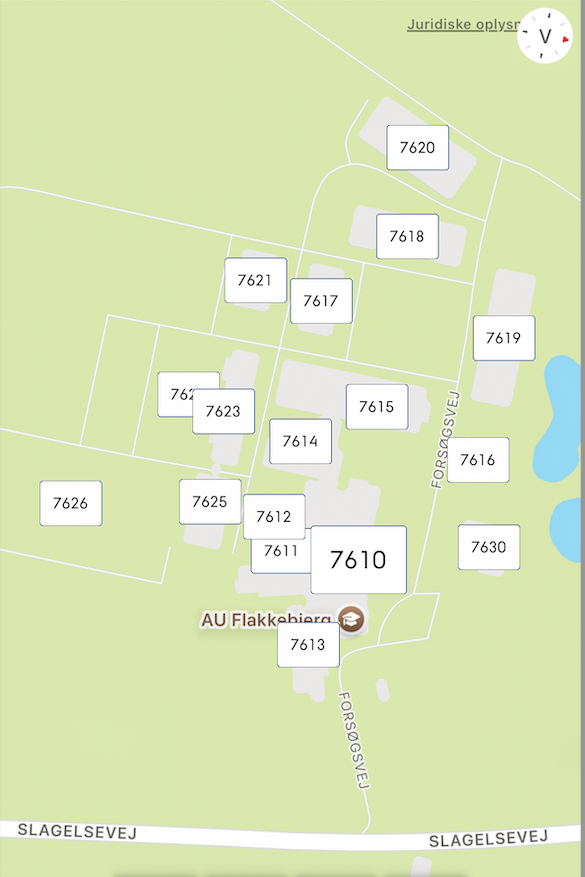
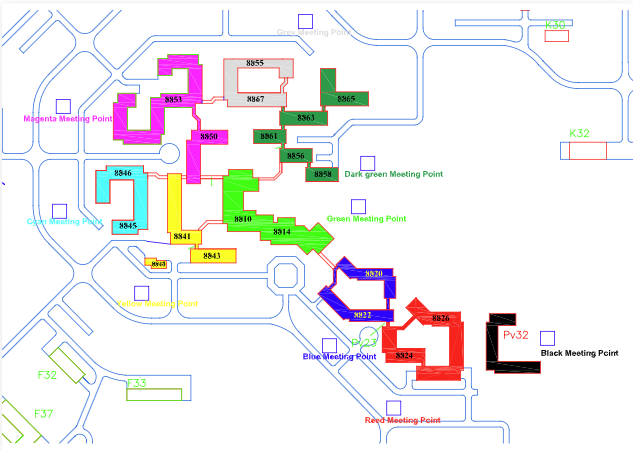
To ensure a safe, consistent and well-organised start for everyone carrying out practical work in laboratories, fields or greenhouses, all employees, students and guests must complete the relevant introduction process before commencing work.
The process ensures that everyone receives the necessary safety information, understands the local procedures and responsibilities, and has the appropriate agreements in place for the work they will perform. Depending on the nature of the work, this may include an introduction meeting, a safety round and, where independent work is planned, completion of The Good Plan.
By following a common process, we promote a safe working environment, ensure compliance with health and safety requirements, and create a shared understanding of roles, expectations and responsibilities across the department.
Please find below the documents that apply to your work and complete the required agreements before starting work in the laboratory, field or greenhouse.
Good practice for working in the lab/field/greenhouse incl. Agreement for work
Meetings
Meetings
Outlook and AGRO e-mail
Outlook and AGRO e-mail
At AGRO, we use Outlook and we all have to keep our calendars updated with meetings, courses, working from home, holidays, etc.
Most employees, who are affiliated to the department, will be assigned an AGRO e-mail during the time he/she is working as a guest, or as a salaried employee. The e-mail will be closed by default the day after the employee stops working at AGRO. If the e-mail needs to remain open after employment, this special agreement must be made with the employee’s immediate section manager.
In this instruction, you may read and learn how to give your department secretary permission to update your Outlook calendar.
It is important that you always keep your Outlook calendar updated, if you are out of office due to teaching, travelling, attending courses, working from home, etc.
Office allocation
Office allocation
Allocation of office rooms:
- Foulum: Section coordinators
- Flakkebjerg: Anne Heesche and Charlotte Hamann Knudsen
- Askov: Henning C. Thomsen
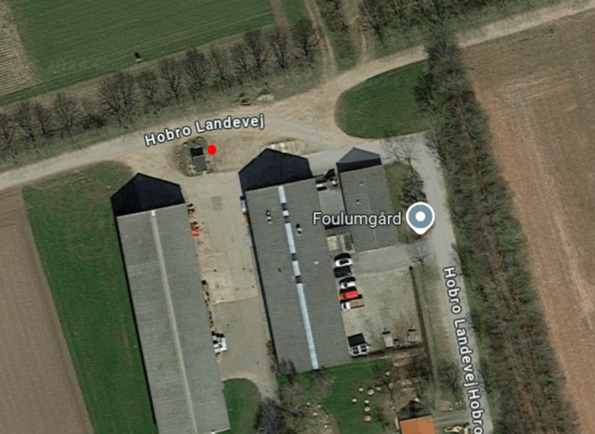
- Foulumgaard: Jens B. Kjeldsen
- Landcraft: Gülnur Dogan
In the event of disputes/queries, the head of secretariat has the overall responsibility for the distribution of offices in AGRO.
Office cleaning
Office cleaning
🌿Good Office Behaviour – Quick Guide
– for a good working environment
🧹Cleaning and tidiness
(Shared offices are cleaned once a week · Single offices every other week)
- Floors and corridors must be kept clear to allow proper cleaning of the offices
- Empty your bin regularly – especially if it contains food waste
- Sort waste according to the signage
- Keep the windowsill clear (and give dead plants a dignified farewell 🌱)
- Remove cables from the floor
- No boxes or empty packaging in corridors – it keeps the area tidy and helps prevent trips and falls
🤝Good behaviour in shared offices
- Attend online meetings in another room
- Avoid food and dishes in the office
- Air out the room during the day
- Be considerate in shared areas
- Do not store equipment, samples, etc. in the office – use designated storage rooms (please consult your technical/administrative supervisor)
- Clothes and towels belong in the changing rooms
- Make agreements with your office colleagues about what works best for you
💬Need help?
Contact the coordinator if you need:
- Noise-cancelling headphones
- Chairs
- Screen, keyboard, mouse, etc.
Admission Card
Admission Card
To gain access to AU's buildings, this form must be filled out. The form can either be filled out before the new colleague arrives or on the first working day. The card is printed in Aarhus and sent to the person who ordered it. Karina Rysholt Christensen and Charlotte Hamann Knudsen can assign access to buildings once the card is printed and ready to be sent. This is done by sending an email with name, au-id and start/end date.
Keys at AU-Viborg
Keys at AU-Viborg
The keys can be ordered here and will be handed over by the secretariat in building 8814, room 3081/3082. Opening hours for key collection are Tuesday and Thursday between 10 am and noon.
If you share offices with others, you must mutually agree whether the office is locked.
Please note that the key is personal and may not be handed over to others.
Access to AU mail after termination of employment contract
Access to AU mail after termination of employment contract
General rule
Before an employee leaves, local management must ensure that the employee cleans up their mailbox and forwards emails relevant to the unit. After the last working day, access to the AU email inbox is normally not possible.
Exceptional access
In special cases, the Head of Department may grant temporary access if there is a documented work-related need.
Conditions:
Access can be granted for max. 1 year after termination
Access must be limited to a few specifically named persons
A written justification is required (this must be filed in Workzone)
Note: Completing articles is not considered a valid justification.
Request procedure
The supervisor/section manager must complete the request form
Send the form to hrbreve@agro.au.dk
The request must be submitted no later than 3 weeks before the employee’s last day
Other important information
Guest access to AU email cannot be extended after termination
AU computers cannot be kept after employment at AGRO ends
Aarhus University cars
Aarhus University cars
Aarhus University's cars must under no circumstances be used for private transportation or transportation of private individuals.
Non-salaried students and guests need to be authorised by head of department before booking/driving the company cars by filling in this form. The form should be enclosed when making the booking in the Outlook calendar.
Always return the car with a quarter tank of petrol/diesel. In each car, you may find Aarhus University petrol cards and these cards should always be used. Receipts must be kept in the bag/folder in the car. Any tickets, including parking tickets, speeding tickets, etc., must be paid by the driver herself/himself.
AU is self-insured, meaning, that AU meets any accidents and property damages which may arise from the use of our official cars. Students are not covered by Aarhus University’s industrial injuries insurance. We therefore urge students to take out their own accident insurance policy. If the car has to go outside Denmark you need to take up a special insurance. Please contact Jeppe or Michael fra driften i Foulum.
Employees, who travel in their own cars, by train, or in Aarhus University cars are considered by "Arbejdsskadestyrelsen" as being a private matter - and therefore, we recommend that employees take out a private, 24/7 accident insurance.
Here is a guideline on how to book a car via Outlook.
Find more information here (only in Danish).
Purchases
Purchases
All purchases at AGRO must go through one of the department's purchasers; they know Aarhus University's purchasing agreements, rules and procedures.
If you make purchases yourself as an exception, the supplier must provide the following information on the electronic invoice to secure a fast process and payment on time:
- AU's CVR no.: 31119103
- AGRO's EAN no.: 5798000877450
- Project and activity number which shall cover the cost of the purchase
- Your name
- Inform the supplier that 'Aarhus University' must be stated as the recipient of the invoice to secure exemption of tax in Denmark
AGRO's purchasers are:
Foulum
- AU223785 Karin Dyrberg - lab articles
- AU734097 Chinette Møller Overgaard - office supply, coffee, books
- AU393679 Anna Dorthe Østergaard - mobile phones and internet connections
- AU223080 Birgit S. Langvad - furniture, screen glasses, language revision, print/copy and costs over DKK 50.000 AGRO
- AU261400 Jens Bonderup Kjeldsen - Workshop and semi-field
- AU809799 Aksel Gaardsted Christiansen - Foulumgård, seeds, entrepreneurs, etc.
- AU553982 Dennis Villadsen - electronics, research equipment and workshop supplies
In Foulum, Anna Dorthe Østergaard is ”buffer” for all other invoices.
Flakkebjerg
- AU465701 Simone Ena Rasmussen - lab articles for PATENT
- AU224258 Bente Birgitte Laursen - lab articles for CROP
- AU546440 Rikke Jakobsen - lab articles for CGB
- AU551861 Jette Charlotte Black Jørgensen - catering, etc.
- AU784718 Anne Heesche - travels, catering outside Flakkebjerg, books and journals
- AU223007 Charlotte Hamann Knudsen - office supply, screen glasses, furniture, printing of books, etc.
- AU223106 Per Heinager - articles for workshop, machinery, gasses, safety equipment
- AU223586 Karen B. Heinager - costs for cars, research articles in relation to field trails
- AU749173 Anders Vestergaard - working clothes and general costs related to field trails
- AU224226 Jakob Sørensen - articles related to green houses
In Flakkebjerg, Anne Heesche is ”buffer” for all other invoices
Askov
- AU223925 Henning C. Thomsen - everything regarding Askov
Aarhus
- AU236063 Gülnur Dogan - buffer Aarhus
- AU233911 Lars Norge Andreassen - elektronics and lab
- AU451102 Luna Kondrup Marcussen - all purchases for ABD-Aarhus
Some companies need a written purchase order, therefore AU has made a template for this
The departments must sign these orders them selves. As a rule it is the project manager who signs these, unles the purchase is above 100,000 DKK, then the head of department will sign.
The formular can be found here.
Travels and meals
Travels and meals
AGRO follows the general travel rules applicable to employees salaried by the state (state employees) as well as AU’s travel policy. Our travel agency is Carlson Wagonlit (CWT), and please contact them and have them draft an itinerary for you and let them make all the bookings. You may also book the train and flight tickets yourself directly on the airlines' homepages. Only be aware that in case of travelling with several changes, then you will be responsible for paying for the additional expenses, if there are problems with the departures/connections.
Do not use other travel agencies than CWT.
For one-day trips, you will be reimbursed against vouchers (reasonable prices), and when travelling over several days, meals are settled per diem to cover your meal expenses. In case of prepaid meals at meetings, conferences, seminars, etc., these must be offset against your per diem allowances.
If you have questions or need assistance with making your settlements (expense or travel), please contact our expert support team in RejsUd, and they will assist you via e-mail or Teams.
Special rules apply for PhD students and postdocs.
Travels where parts of the trip have a private nature
Travels where parts of the trip have a private nature
Travel at AGRO
- AGRO is primarily externally funded. This means that all business travel must be justified on professional and project-related grounds
- Travels may only be booked and paid for to the destination where the meeting, conference or activity is taking place
- This rule applies to all types of projects
Vacation in connection with business travel
- It is possible to take a vacation at your own expense before or after a business trip
- No allowances can be paid for the days taken as vacation
- AU’s travel insurance does not cover the additional vacation
- Please note that some private travel insurance policies do not cover trips combined with a business trip
Work hours and flexitime
Work hours and flexitime
At AGRO, we have a flexible-time agreement (only in Danish) that applies to all technical-administrative employees (TAP) in the department. The agreement does not apply to:
- Employees under the "Local agreement for employees at Aarhus University, Department of Agroecology engaged in particularly seasonal and trial-related work in field trials" (only in Danish)
- Scientific employees employed in accordance with the position structure, cf. the AC collective agreement §13, subsection 5 (only in Danish).
- Managers, chief consultants, special consultants, monthly salaried clerks with availability supplement.
What should I do?
As a TAP employee, you must register your work hours, i.e. when you arrive and depart, in an Excel sheet at Sharepoint. Guidelines for employees and manager can be found here:
Approval of time registration as section manager
Why do I need to use a timesheet?
Pursuant to §4, subsection 1: "… the employee must calculate his work hours himself. Work hours are registered daily or at the earliest possible opportunity in the registration system designated by the department”.
What will it be used for?
You must calculate your work hours (i.e. when you arrive and depart) in the form. You and your immediate manager must keep an eye on the balance and ensure that you do no accrue too many flex hours.
Work hours - registration
Work hours - registration
A standard day for full-time employment is 7.4 hours (7 hours and 24 minutes). In mitHR, lunch is not recorded, so if a standard day is recorded, it is 6.9 hours.
Course attendance: Employees who attend courses as ordered or requested by the appointing authority, or who attend courses that are deemed to be of value to the institution, will have working hours and travel time in connection with courses calculated according to the general rules in the working time agreement. Similarly, inconvenience allowances are given according to the general rules in the working hours agreement. Remember, you must always agree with your immediate manager about earning hours
When participating in other courses, i.e. courses that are not part of the job, the appointing authority may, after a specific assessment, grant leave with or without pay according to the general rules. Section 3 https://cirkulaere.modst.dk/static/Circular/2015/018-15.pdf
Travel time in connection with business trips is included, but not more than 13 hours per day. The 13-hour limit only applies to the travel time itself. §7 cirkulaere.modst.dk/static/Circular/2015/018-15.pdf paragraph 5
Participation in social and scientific events such as group excursions, summer hangout, AGRO days, fairs, conferences, theme days, etc. is compensated with hours corresponding to a standard day.
Breaks: An employee whose daily working hours exceed 6 hours is entitled to a break. Breaks are only included if they last less than a total of ½ hour per day and the employee is available to the employer and is not allowed to leave the workplace, cf. Section 7 of Arbejdstidsregler for tjenestemænd i Staten.
Only for TAP
Overtime: If the hours worked have exceeded the working hours for the period, the hours are compensated with time off in lieu of the same duration with a supplement of 50%. It is a prerequisite that the work has been ordered or necessary for the proper performance of the work tasks. §8 https://cirkulaere.modst.dk/static/Circular/2015/018-15.pdf paragraph 5. Overtime must always be approved by management.
Flextime: when the employee decides to work beyond the daily norm, e.g. to complete a task. It is thus not ordered or necessary for the proper performance of the work tasks. The hours are compensated 1:1.
Fieldwork: Fieldwork is work organized as campaigns outside the normal workplace. Fieldwork can be performed both as one-day work and as work over several days, that includes overnight stays. Here, working hours are calculated according to the following rules:
One-day work: Working hours start from the time you start work/leave your normal place of work until you return.
Multi-day work: Working hours start on day 1 when you start work/leave your normal place of work and until you arrive at the accommodation. Work on the next day starts when you leave the overnight accommodation and goes on until you return to the overnight accommodation or your normal place of work again.
If someone is working late in the evening because of overtime, AGRO accepts that a break is taken at the place of work to eat dinner. This break is counted as working time and is in addition to the ½ hour mentioned above.
Distance work
Distance work
At AGRO we value social and professional cohesion with focus on well-being, which is why physical presence is the default. At the same time, we want to allow for flexibility where it is possible and appropriate.
Working from home must always be agreed with your immediate leader (leader of section, secretariate, field station, department), based on an individual assessment that considers the needs of the employee, colleagues, and the department.
For staff groups where working from home is an option, the following applies:
- You may work from home up to one day per week. In special cases, alternative arrangements may be agreed with your immediate manager.
- Work-from-home days with time period must be visible in the calendar and there must be contact information (e.g., phone number).
- Working at any of AGRO’s locations or in the field or attending meetings or conferences counts as being physically present – not as working from home.
- If you are invited to in-person meetings, physical attendance is expected, even if it falls on a planned work-from-home day.
- You must organize the home working place in a proper way.
Holidays and special holidays
Holidays and special holidays
In AGRO, it is important for all employees to take holidays, as it helps to ensure that we relax, recharge and see everyday life from a different perspective. This helps reduce the risk of a wide range of illnesses, including stress. It also makes us more productive and creative when we return to work.
Therefore, all holidays and special holidays must generally be taken within the current holiday year, cf. AU's guidelines: https://medarbejdere.au.dk/administration/hr/ferie/afvikling-af-feriedage- og-saerlige-feriedage/.
Holiday planning is done in consultation with your manager and any immediate colleagues. As far as possible, your wishes for holidays must be accommodated.
If the holidays are not planned and registered in mitHR, the holidays will be determined and registered administratively.
The holiday accrual year for general holiday runs from 1/9 to 31/8 the following year and
The holiday settlement year for regular holiday runs from 1/9 to 31/12 the following year
The holiday accrual year for special holidays runs from 1/1 to 31/12 the same year
The holiday settlement year for special holidays runs from 1/5 the year after they are earned to 30/4 the following year
Annual cycle for holiday registration and follow-up
- In early September, management informs all employees that a new holiday year has started and that holidays for the entire holiday period (from September 1 of the current year to December 31 of the following year) must be planned.
- In mid-October, management follows up on whether everyone has taken their main holiday. If you have not registered your main holiday, you will be contacted to see if there has been an error, otherwise the holiday will be registered administratively. As of December 31, you can have a maximum of 6.24 holidays left, all other days must be taken. This corresponds to the number of days earned in September - November (current year). Holiday earned in December will be accrued on 31/12 and will be available from 1/1 (following year).
- In mid-January, management checks that all holiday has been taken according to the guidelines.
- At the beginning of February, all employees are instructed to schedule special holidays and to register the time of taking unused holiday, including the main holiday, for the current holiday period.
Mass registration of holidays
For all VIPs, mass registration of the main holiday and the remaining holidays is done in February and October, i.e. if you do not plan and register your holidays in mitHR yourself, the secretariat will, based on AU's guidelines, register your holidays for you in advance. Only available paid holidays are registered in the standard periods - from the first day of the period until all holidays are registered (e.g. if you have only earned 10 paid holidays in July, only the first 10 holidays are registered in week 27+28)
Transfer of holidays/special holidays:
As a general rule, all holidays and special holidays must be taken within the given holiday year. In very special cases, special holidays can be carried over from one period to the next. A maximum of 5 days can be carried over and there must be a justification and a concrete plan for the days carried over.
Employees with a fixed end date
Approximately once a quarter, the secretariat sends an overview to employees whose fixed-term employment expires within the next year of how many holidays and special holidays you have left. The overview is sent with a copy to your section manager/supervisor.
You are required to settle accrued holidays, so that at the time of resignation a maximum of the following is transferred/paid out:

At the same time, you are informed that if you do not plan and register your holiday in mitHR yourself, it will be notified for settlement in the last part of the employment period that falls within the given holiday period.
Holiday earned in the month you resign will be transferred to Feriefonden.
If your contract ends in the middle of a month, you can have one more day than the month before. E.g. if you stop on 14/4 you can have 8 days left.
Holiday hindrance
If you have had a holiday hindrance such as illness, maternity leave or adoption levae that has lasted until the end of the holiday period on December 31, the first four weeks of holiday will automatically be transferred to the next holiday period. A transfer of the 5th week to the following holiday year can be agreed. For the main holiday, the holiday obstacle must have made it impossible to take 3 consecutive weeks until September 30. It is recommended that holiday is planned in continuation of maternity leave.
FAQ
What do I do if holiday registered in myHR needs to be moved?
If your holiday has not yet started, you can change the dates in myHR yourself. This is done under “Existing absence”. This can be done up to the day before the planned holiday.
If the holiday is registered but not taken at the given time and the date has passed, contact your section coordinator, who can move the holiday to the new dates you provide.
I get an error when I try to register holiday or special holidays
You cannot register more holiday than you have earned at the time you want to take it. If you try to register more days, you will get an error.
What happens if I don't register my own holiday in myHR?
If you are a VIP, your holiday will be mass registered from the secretariat according to AU's guidelines.
If you are a TAP, your holiday will be notified for processing by the secretariat and ultimately registered administratively.
Where can I get help with registering absence in myHR
In myHR it is possible to get guidance on how to register absence, view your balance and get help understanding any error messages you may receive. The guides are located under the “Guide me” button and can be found under the actions “Add absence”, “Absence balance” and “Existing absence”.
Overtime
Overtime
Overtime (only applicable for TAP)
The employee registers in mitHR the actual number of hours (1:1) worked on the relevant projects that require time registration. In addition, all hours are recorded in the spreadsheet used for the position. Reference is made to the relevant agreements.
A local agreement 'local agreement for employees' has been concluded for employees who are engaged in seasonal and trial-related work in field trials.
Employees (MARK excepted) fill in the "Over time - Indoor work" for the relevant days on which overtime has been worked. Forms can be found on the Intranet under forms. MARK employees fill in the form for all days. Cf. the local agreement, the form must be sent to the section/operations manager no later than the 5th of the month after the overtime work has been carried out. The form is sent electronically in an Excel version.
The section/operations manager forwards the form to the secretariat before the 10th of the month. The forwarding is seen as approval of the overtime.
For MARK's employees, Disadvantage allowances are always paid from the section account. For other employees under the local agreement with field work, the project number to which the overtime relates is entered on the form.
Saved hours should be regularly taken off as far as possible in relation to the work tasks. Conversion to savings days can in special cases take place by agreement with the immediate manager, cf. Circular on the state's working time agreement §11. It must then be approved by the head of department. The employee can have a maximum of 74 savings hours in total. An assessment is made in relation to time off and any conversion in December and the final conversion takes place in April, when working hours are calculated according to the local agreement.
In general
The secretariat sends a form to HR support for the employees who must have been paid a disadvantage supplement.
The secretariat ensures that the month's overtime is recorded in a separate spreadsheet for the entire department
Every quarter, an overview of overtime hours is sent to each employee (except MARK sections), as well as to section/operating managers and head of department
URIS: Collaboration with and travel to risk countries
URIS: Collaboration with and travel to risk countries
AU has implemented guidelines to protect research and innovation work from becoming a target for espionage or misuse. The general URIS guidelines can be found here: General URIS guidelines
A number of precautions apply in connection with travel to URIS-risk countries – currently Iran, China and Russia.
Before booking the trip, the traveller must complete a travel risk assessment form. This form must be approved in writing by the head of department by sending the form from this page:
to the Head of Department, Department of Agroecology head.agro@au.dk. Please write in the subject line: "name, country, purpose, date". If you are doing multiple travels with the same purpose, you can gather them in one application.
Risk assessment and approval are filed in Workzone.
With regard to IT equipment, staff must follow the advice in the ‘Business trips to high-risk countries’ section of the information security webpages on the AU website. When travelling to high-risk countries, staff must take special travel smartphones and laptops with limited access to AU’s data and systems. These devices can be borrowed from AU IT.
Illness
Illness
Sick leave must always be reported to the section coordinator on the first day of sick leave before 09:00 via phone call or e-mail. If the illness occurs in conneciton with vacation, there are special rules which you can find here.
In case of long-term illness, i.e. >20 days, the coordinator must notify Karina Rysholt Christensen, who will ensure that the sick leave is reported to the HR Absence Team. After 30 days of illness, it will be possible to apply for a refund, and PhD students are entitled to an extension of their study period.
In connection with long-term illness (more than 21 days), Karina Rysholt Christensen and the section manager will convene a sickness absence meeting with reasonable notice no later than 4 weeks after the first day of absence. At this meeting, a declaration of opportunity must be completed, which the employee must then take to their doctor.
If the absence continues, an interview must be held every 2 to 4 weeks.
Karina Rysholt Christensen and the section/operations manager conduct the sickness absence interview. The purpose of the interview is to:
Discuss the status of sick leave.
Discuss the possibilities for full or partial return to work.
Clarify any need for protective measures.
It is mandatory to take notes during a sickness absence interview. Karina ensures that a note is made of the conversation and any agreements made. The note is sent to the head of the secretariat, who ensures that it is logged. It is possible to bring an assistant to the interview if desired.
More about illness can be found here.
And for PhD students here.
Sick leave MUST be registered in mitHR. If the employee is unable to do so, the absence must be entered by the section coordinator or by Karina.
SDD i AGRO
SDD i AGRO
(copy 1)
SDD (Staff Development Dialoguess) in AGRO are held every spring in accordance with AU's guidelines. All employees are invited to a SDD and the same applies to enrolled PhD students.
According to the circular on senior schemes, employees who have reached the age of 60 must be offered the opportunity to discuss senior perspectives in connection with the SDD. A more detailed description of this can be found in AU's senior policy. It is up to the individual section/field manager how the opportunity for senior interview is articulated.
Requirements/needs/benefits of learning Danish can advantageously be discussed during performance reviews with foreigners.
Staff Service at AU
Tools, guidelines and services for all staff members
Search the index: